Time-based Formula Conditions in Financial Settings
Previously, updating a formula would retroactively affect all reservations, creating challenges when changes needed to apply from a specific date onward. The lack of flexibility caused reporting issues such as applying new commission changes when starting a new year.
Now, with time-based formulas, users can control exactly when and how formulas are applied. This can apply to cases such as updating commission rates, fees, or other settings to take effect on a specific date without affecting previous reservations.
How it works:
-
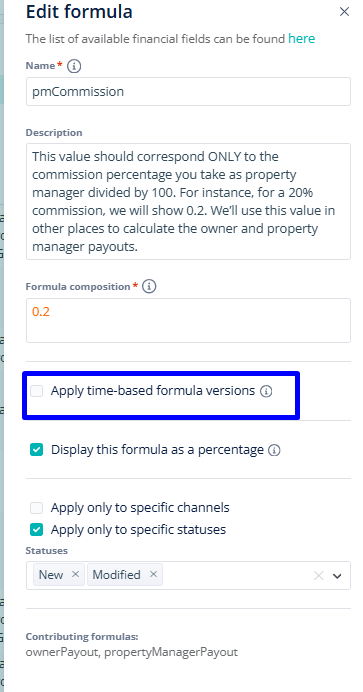
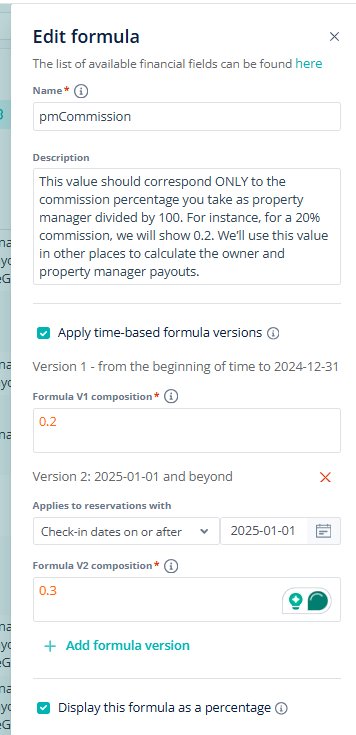
Under the formula settings, select “Apply time-based formula versions”
-
Choose an event (ex. check-in, check-out, or creation date)
-
Set a date to define when a new version of the formula should start applying
-
Create multiple versions as needed, including for past dates, ensuring the accuracy of reports
This feature is available at the listing level, so users can fine-tune formulas for specific properties. Additionally, the ”Copy Settings” button allows users to save time by replicating formula changes across multiple listings.
For more info about time-based formulas or adding custom formulas, check out the USER GUIDE.