Set-Up Automated Guest Reviews for Vrbo Reservations
Reviewing guests is critical to your short-term rental business for several reasons, like:
-
Encouraging good guest behavior: When guests know they’ll be reviewed, they’re more likely to follow rules and treat the property/neighbors respectfully
-
Reciprocity leads to more bookings: Guests are much more likely to leave a public review post-stay when they see the host reviewed them first. The more positive reviews you receive, the higher your listing will rank in search results.
-
Fulfills OTA requirements: Airbnb, Vrbo, Booking.com, and other online travel sites require hosts to maintain a minimum responder rate and average rating.
So, maybe now you can understand why we're so excited to announce that you can now set-up auto-reviews on Vrbo.
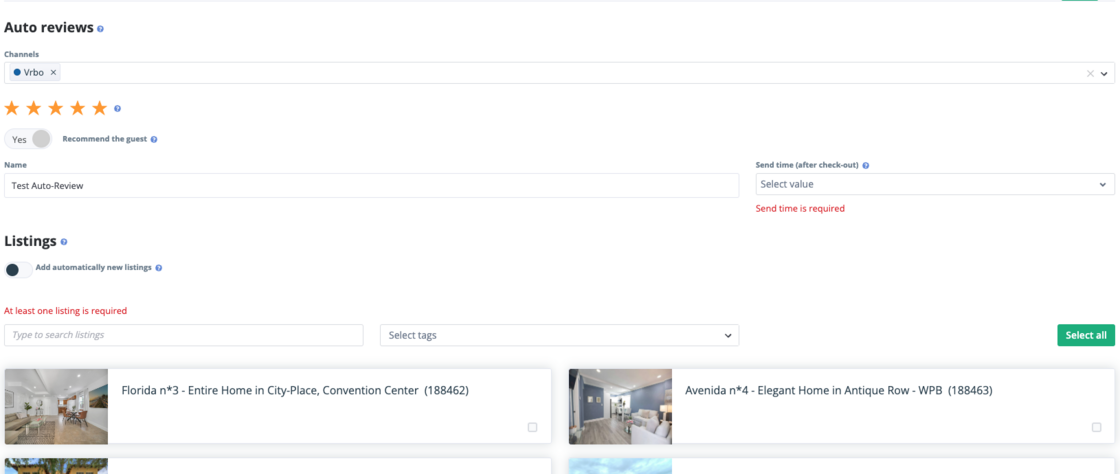
Where before, users could only set-up auto-reviews for Airbnb, now you can set-up an automation to submit a guest review with pre-selected:
-
Number of stars (1-5)
-
Listings it's applicable to
-
Number of days after check-out to send
-
Whether you recommend the guest or not
You can also easily edit any existing auto-review template to now include Vrbo reservations.
How It Works
-
In the Reviews module, click on the "Auto-reviews" tab
-
Select "Add auto-review" in the top right corner
-
Select channels its applicable for (Airbnb/Vrbo), # of stars, whether you'd recommend the guest, and send time
-
Select the listings you want this auto-review to send out to
For more information on Guest Reviews, check out our USER GUIDE