Set House Rules for Booking.com Listings
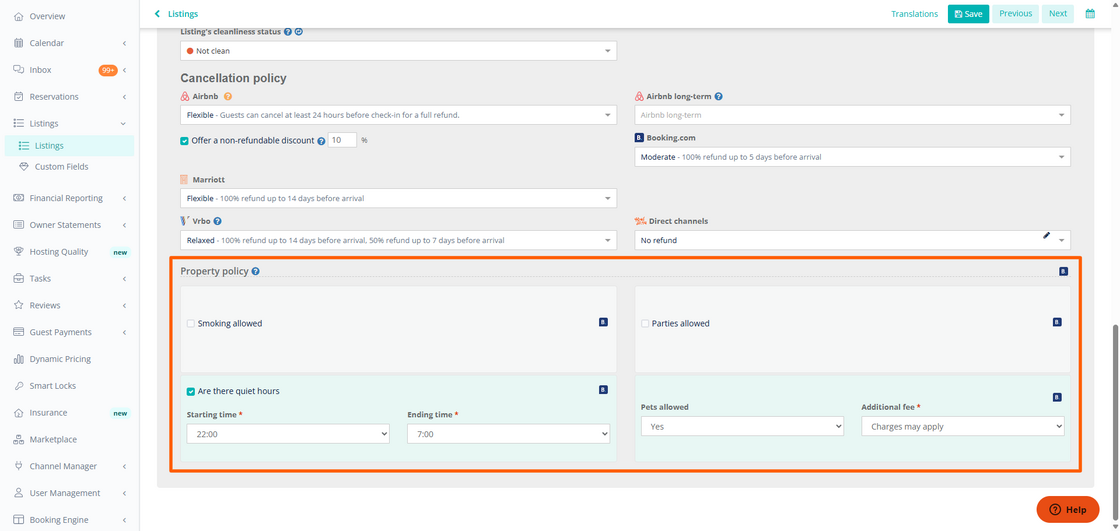
House rules (aka property policies) are an important for protecting your property, reducing complaints, and preventing misunderstandings.
To ensure guests know what to expect when staying at your rental, Hostaway property managers can now configure a set of standard house rules, which are shared with guests when they book your property from Booking.com.
Unlike amenities, policies can be enforced so the property manager has leverage if they need to contact Booking.com’s support team when a guest misbehaves.
How it works
-
In the Listings module, click "edit" on any listing connected to Booking.com
-
Go to the "Additional info & Policies" tab, and scroll down to the Property policy section to add your policies.
Note: house rules are exported to new listings created on Booking.com via API, so anything added when the listing already exists on the channel will not be synced.
For tips on how to write great house rules, check out our BLOG
For more information on exporting Booking.com listings, check out our USER GUIDE