See Unpaid Reservations, Pets & Children at a Glance in the Calendar
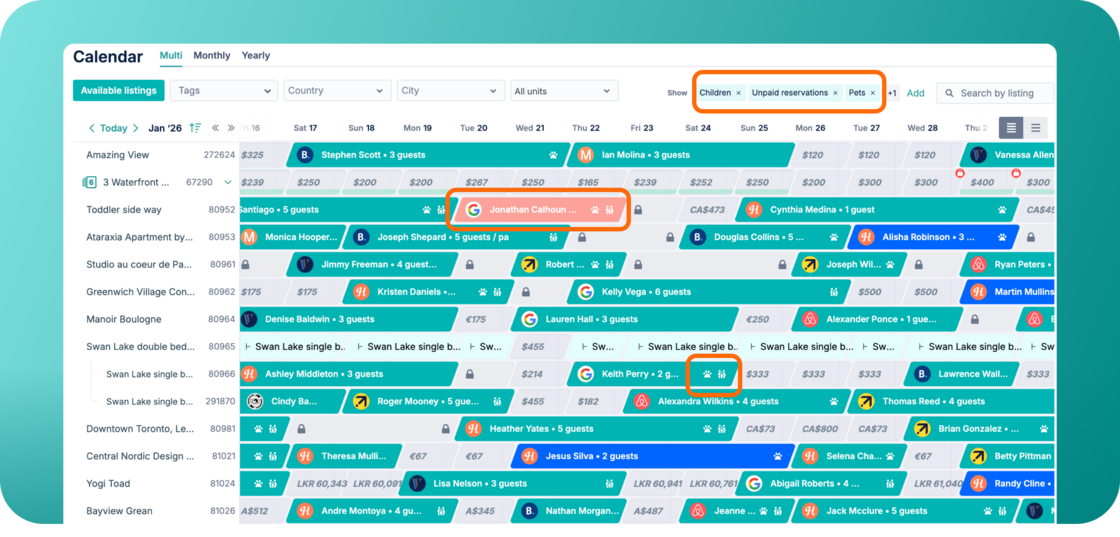
We've added new visual indicators to the Calendar, giving you faster access to the reservation details that matter most, without extra clicks.
What's New:
Within the Calendar, reservations are now enriched with clear visual cues:
-
🐾 Pets — a paw icon appears on reservations that include pets.
-
👨👩👧 Children — a family icon appears on reservations that include children.
-
Unpaid reservations — these are now highlighted in light pink, so you can immediately spot bookings that still need to be paid.
These details are also surfaced in the hover tooltip and the reservation detail modal, so the information stays with you wherever you are in the Calendar.
How It Works:
-
Open your Calendar.
-
Click the "Show" menu.
-
Enable Unpaid, Pets, and/or Children.
The selected indicators will instantly appear on your reservations.
To learn how the Hostaway Calendar works, check out our USER GUIDE.