Prevent Double-Bookings: Refuse Bookings When Smart Reassignment is Impossible
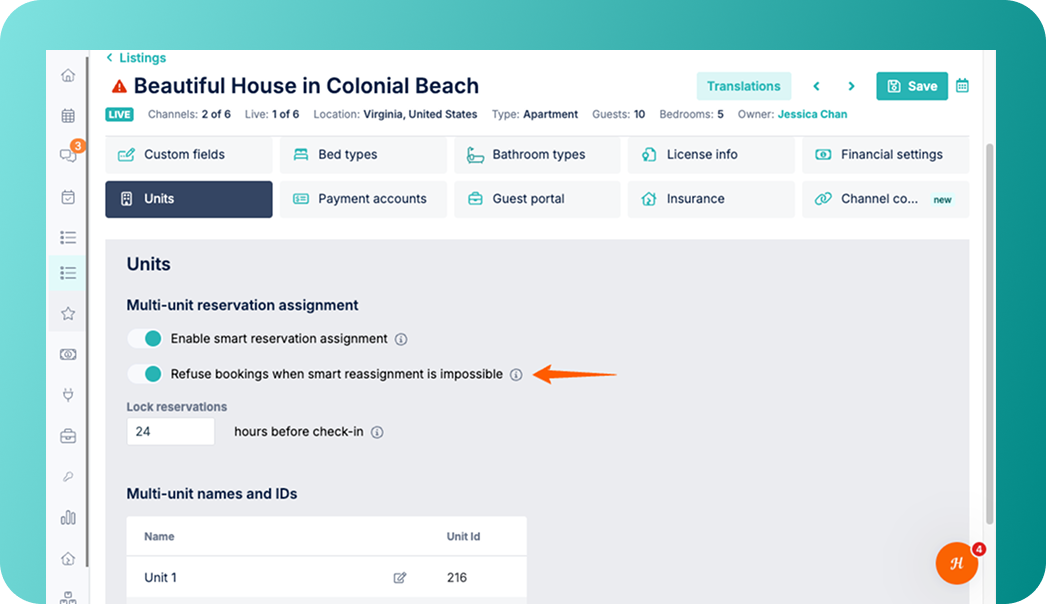
To help you eliminate these operational headaches, we have introduced a new setting to prevent double bookings before they happen.
What's New:
-
New "Refuse bookings" setting: Available under your listing's units tab, this setting helps you automatically block incoming reservations if your units cannot be dynamically rearranged to accommodate them.
-
Automated availability protection: Every hour, our system attempts to reshuffle existing reservations to create blocks of consecutive availability across your units (Smart Reassignment). If the system cannot find a valid configuration to accommodate further reservations, it will adjust your Booking.com availability automatically to prevent problematic bookings from getting through.
Why This Matters:
-
Zero manual work for double-bookings: No more dealing with stressful last-minute double-bookings or manually scrambling to rearrange guests across units under tight deadlines.
-
Weigh revenue vs. operational load While this feature reduces manual overhead, it does prevent some reservations from coming through. It is ideal for property managers where the operational cost of manual guest reshuffling outweighs the potential revenue of those extra last-minute bookings.
How It Works:
-
Go to Listing
-
Navigate to Units → Multi-unit reservation assignment
-
Toggle on Refuse bookings when smart reassignment is impossible
For an overview on Smart Reservation Assignment, check out our USER GUIDE.
Note: This feature currently works for Booking.com only. Other OTA channels will continue to rely on standard Smart Reassignment alone.