New Hostaway Inbox to help you respond to guests faster
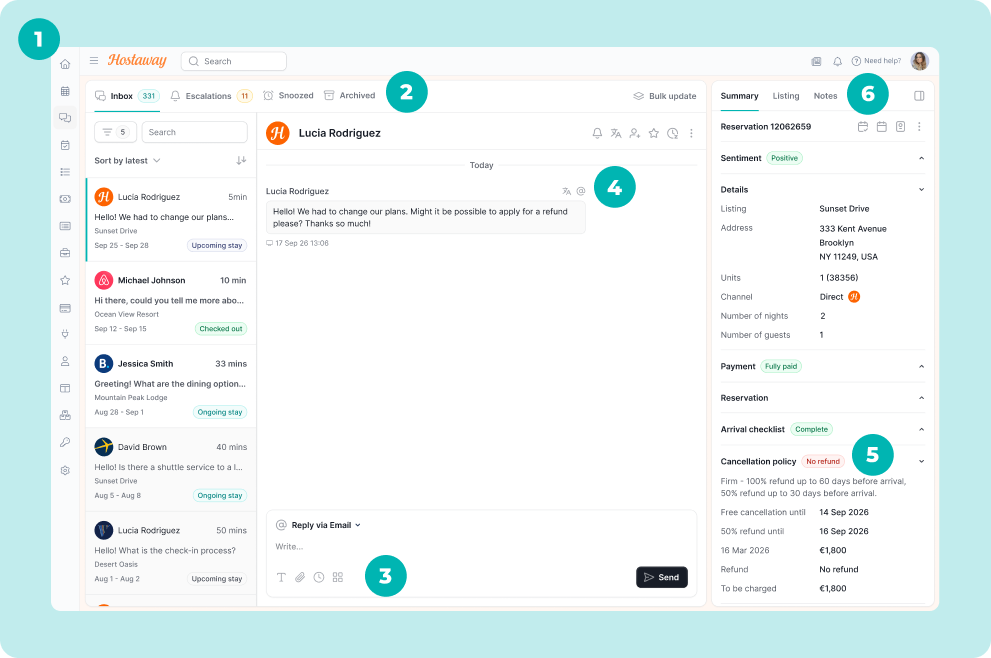
We have redesigned the Hostaway Inbox with a more organized layout, making your essential tools more accessible at a glance.
What's New:
-
Distraction-free conversations: We moved AI Replies, Automations, and Message Templates to the left menu. This keeps your inbox clean and dedicated entirely to the chat you are having.
-
Prominent quick actions: Snoozing, escalating, and archiving buttons are now located clearly at the top of your inbox for quicker organization.
-
Templates in your text box: You can now select and apply message templates directly inside your text box as you type.
-
In-message translations: Translate guest messages from all channels into your native language with a single click.
-
Quick sidebar access to guest data: Important details like cancellation policy, arrival checklist and return guest history are now available in your sidebar. You can search for specific amenities or custom fields without leaving the chat.
-
Side-by-side calendars & notes: New tabs in the side panel let you view the listing calendar and manage guest, reservation, or conversation notes simultaneously.
Why This Matters:
-
Save time on every reply: Message template access in the text box and quick action buttons allow you to respond and sort guest inquiries quicker.
-
Get faster context: In-message translation removes the need to copy-paste into external translation tools.
-
Keep everything at your fingertips: Having listing notes and calendars right next to your active chat box prevents mistakes and saves you from switching between tabs.
To learn more about the updated inbox layout, check out our USER GUIDE.