Multi-Unit Custom Fields & Automations
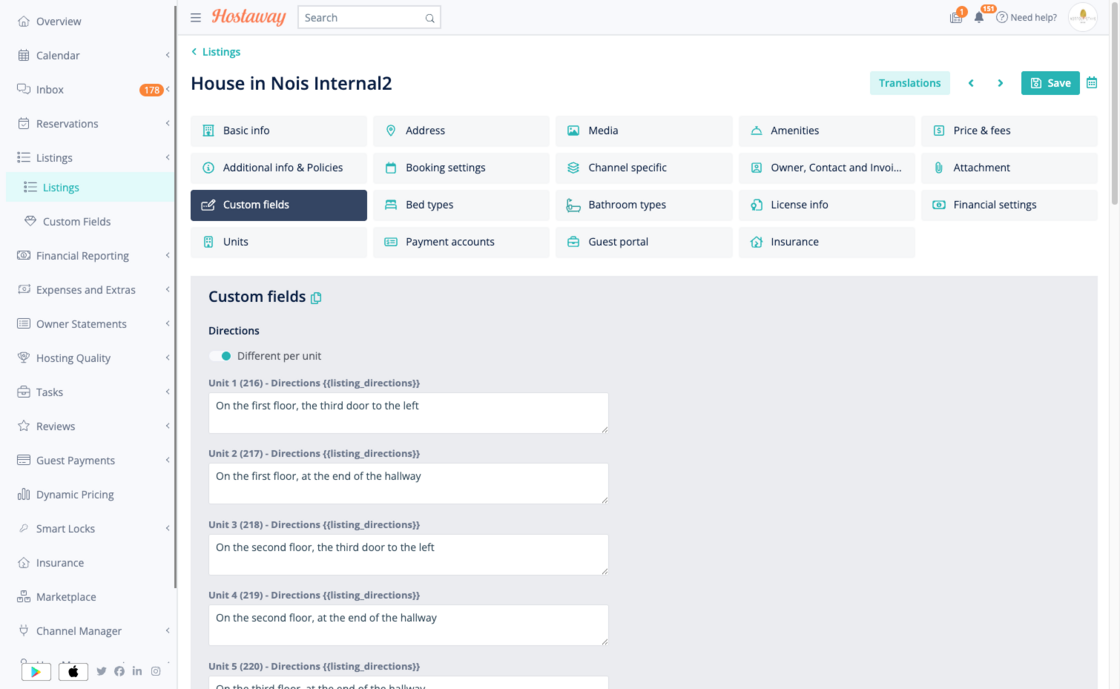
We've just rolled out a new upgrade for multi-unit property managers. You can now set custom fields at the unit level and apply new automation options for your listings.
How it works:
-
Go to the Listing edit page. In the Custom Fields tab, you can now set up fields for each listing or for each unit.
-
Automations can use unit-level custom fields. This makes it easy to share details like check-in instructions, WiFi passwords, or smartlock codes for each unit.
-
Listing-level custom fields: No change. Automations use the field as before.
-
Unit-level custom fields: Automations will use the correct value for each unit. Guests always get the right information.
Why it matters:
-
Managing multi-unit listings is now easier and more flexible.
-
You can automate guest communications and instructions for each unit. This saves time and improves the guest experience.
For more details about multi-level custom fields and automations, check out our USER GUIDE.