Multi-Date (Bulk) Management for Mobile Calendar
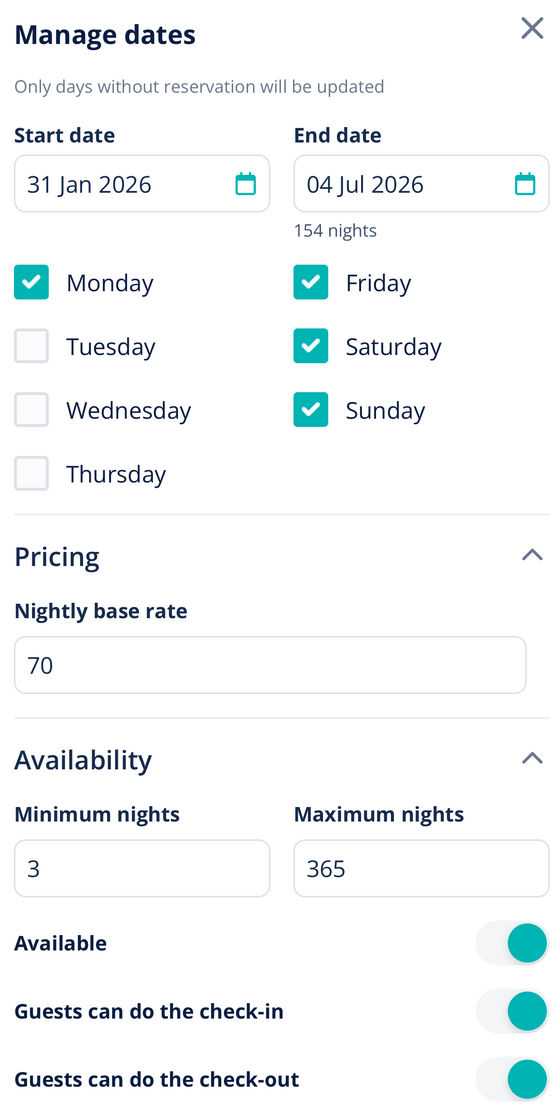
We're excited to bring the Manage Dates feature to mobile! Property managers can now apply bulk calendar changes directly from their phone—no more waiting to get back to a computer.
Key Capabilities:
-
Bulk Date Range Selection – Tap your start date, tap your end date, and you're done
-
Day-of-Week Filtering – Apply changes only to specific days (e.g., weekend pricing for an entire month)
-
Full Configuration in One View – Set pricing, block/unblock availability, apply min/max nights, configure check-in/check-out rules, add rule-sets, and calendar notes
-
Multi-Property Support – Manage non-consecutive dates across different listings
Why it matters:
Before: Mobile users could select date ranges but lacked advanced controls—forcing them to switch to mobile browsers or wait for desktop access.
Now: Full desktop-level functionality on mobile. Handle urgent bulk updates (emergency maintenance blocks, seasonal pricing adjustments, weekend premiums) immediately from anywhere.
How to access:
Update to the latest version in the App Store. This feature is available with iOS App Version 1.29.0.
For more information on the mobile calendar, check out our USER GUIDE.