Manually Override Dynamic Pricing From Calendar View
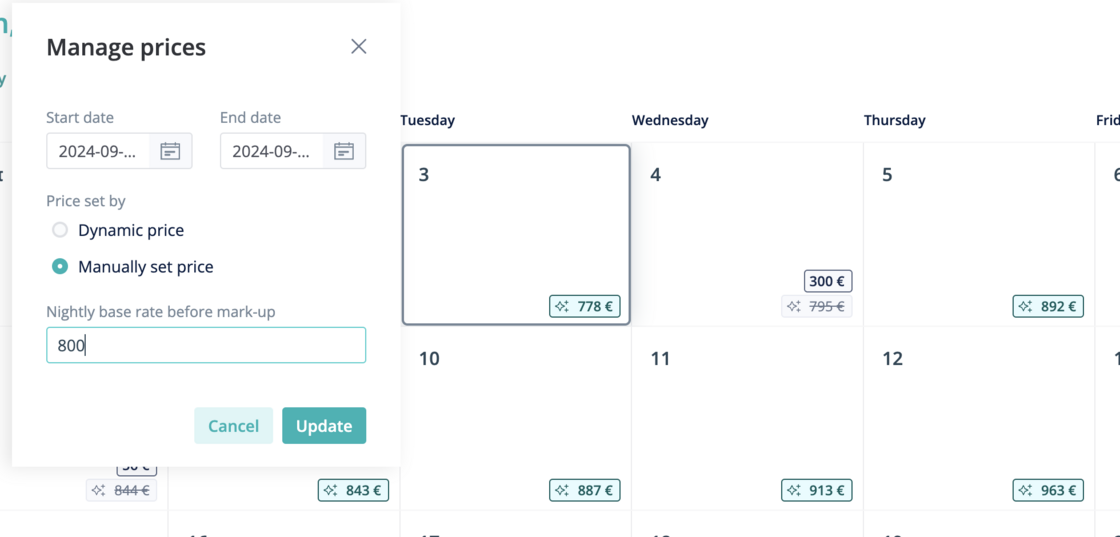
On a listing's Dynamic Pricing Calendar View, you can see which nightly prices were set by Hostaway's Dynamic Pricing algorithm, and which ones were updated manually by you.
Now, you can not only view which nights are manually priced, you can update the prices for any night directly on the calendar!
How it works
-
In the Dynamic Pricing module, click the "Calendar" button next to any listing with Dynamic Pricing active

-
On the calendar, click on any date you wish to update to manual pricing (or change back to Dynamic Pricing).
For more information on Dynamic Pricing, check out our USER GUIDE