Manage Instant Booking Options on Listing Level
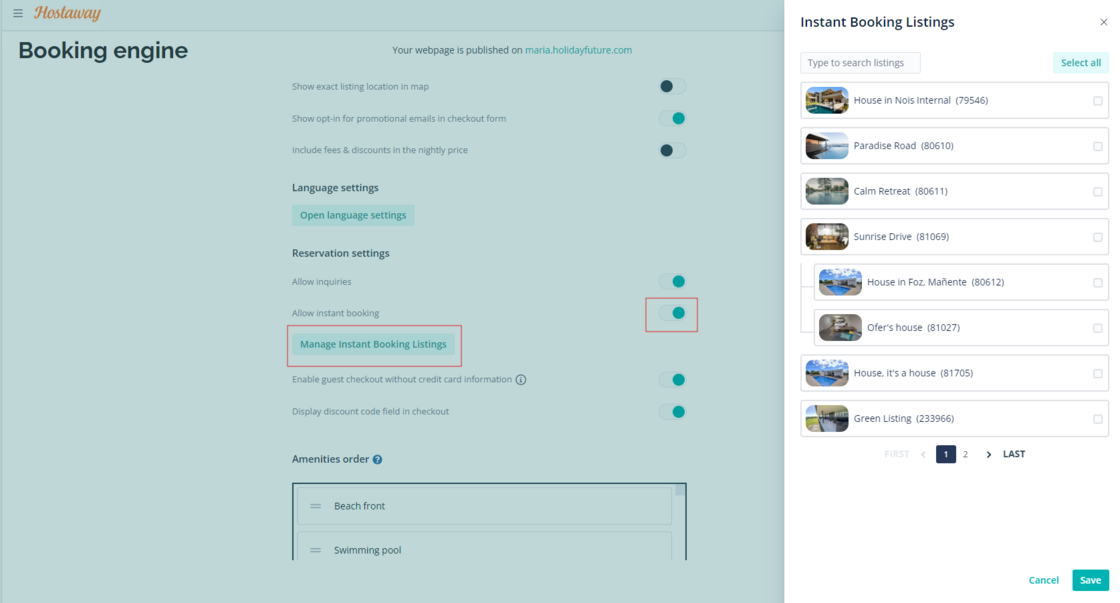
We’re thrilled to grant you the ability to individually manage listings that are instantly bookable. Previously, you were required to create separate websites or remove listings based on whether you wanted the listings to be instantly bookable on the same booking engine. Now, you can have both instant bookable listings and non-instant bookable listings within the same booking engine.
How it works:
-
Go to Booking Engine
-
Click on “Settings”
-
Click on “Basic”
-
Turn on toggle for “Allow Instant Booking”
When this is done, a new button called “Manage Instant Booking Listings” will appear on your Booking Engine settings page. In the side window, you can select for which listings instant booking will apply:
-
If no listings are selected, instant booking is applied to all current and all new listings added in the future.
-
If some, or all, listings are selected, instant booking will apply to only the selected listings. New listings will not be included automatically.
For more info, you can refer to our listings USER GUIDE.