Introducing Graduated Taxes
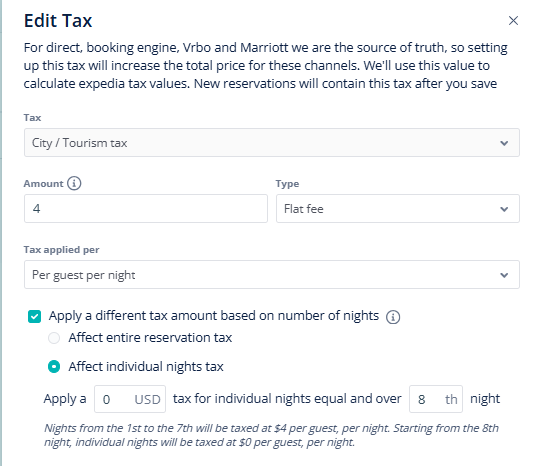
You can now set different tax rates for extended stays with our new Graduated Taxes feature. Previously, the lack of support for graduated taxes led to inaccuracies, extra manual work, and compliance challenges with tourism taxes.
With this update, you can easily set different tax rates for different parts of a guest’s stay—for example, one rate for the first week and a lower rate for additional nights. The system will automatically apply the correct rate to each night after your chosen threshold.
How to Get Started:
-
Go to Financial Settings > Taxes
-
Edit your desired tax
-
Select the Affect individual nights option when setting your new rate
-
You can also adjust this in Listings > Edit > Financial Settings for specific listing needs
Graduated taxes help you price more accurately, stay compliant with local regulations, and reduce manual adjustments. Here is our USER GUIDE for more details on Graduated Taxes.