Future “Quick Dates” added to Financial Reporting and Expenses & Extras
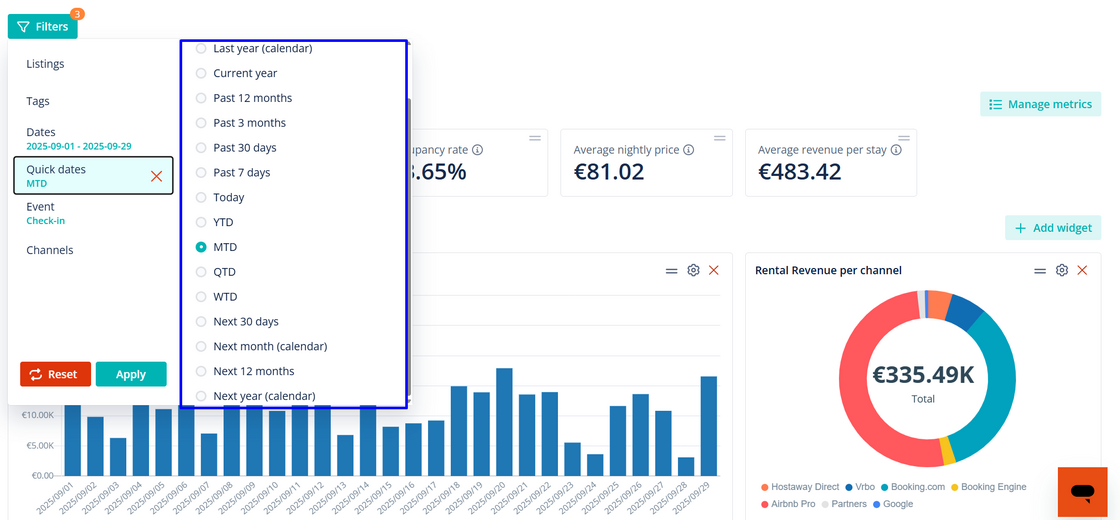
You no longer need to manually update date ranges just to see what’s coming up. Now, with the new future Quick Dates, you can see what’s ahead faster and more easily.
What filters we've added for future Quick Dates:
-
Next 30 days
-
Next month (full calendar month)
-
Next 365 days (rolling year)
-
Next year (full calendar year)
Why it matters:
-
Easily see upcoming financial data such as revenue, occupancy, expenses and more.
-
Build custom views that always show what’s next.
How it works:
-
Open the date filter in any Financial Reporting section or Expenses & Extras.
-
Select one of the new future ranges under Quick Dates.
-
Save as a custom view for to access up-to-date future date ranges (optional).
For more details around filters and custom views for financial reporting, check out our USER GUIDE.