Easier Management of Booking.com Taxes and Fees
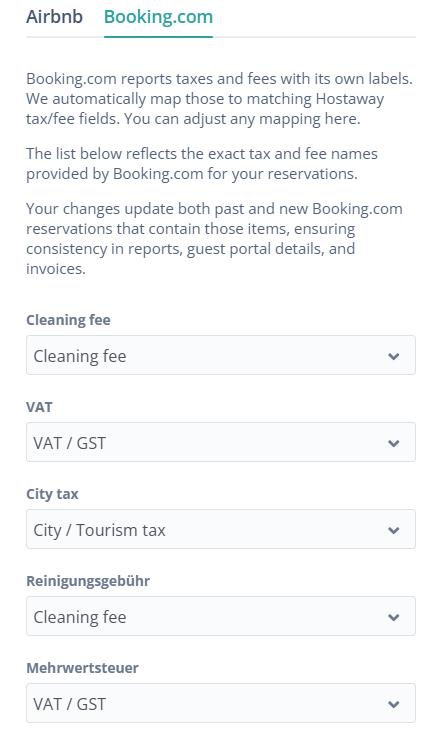
We are thrilled to share an update that makes it easier to manage Booking.com taxes and fees in Hostaway. Now, any newly received fee or tax from Booking.com will be automatically mapped using AI to the most appropriate financial field, instead of defaulting to "otherFees."
This change will apply to reservations with check-in dates in 2026 and later. Reservations with check-in dates in 2025 will remain unchanged to stay consistent with existing reports.
How it works:
-
Get automatic AI mapping for any new Booking.com fees and taxes.
-
See new fees and taxes classified right away, without any manual mapping.
-
To view and configure your fees and taxes, go to: Financial reporting > Financial settings > Taxes > Taxes mapping
Why it matters:
This update makes your financial reports clearer and more accurate. Less time will be spent on manual work, and new Booking.com fees and taxes will be handled as soon as they appear.
For more details on adding taxes, check out our USER GUIDE.