Download Data From Your Analytics Board
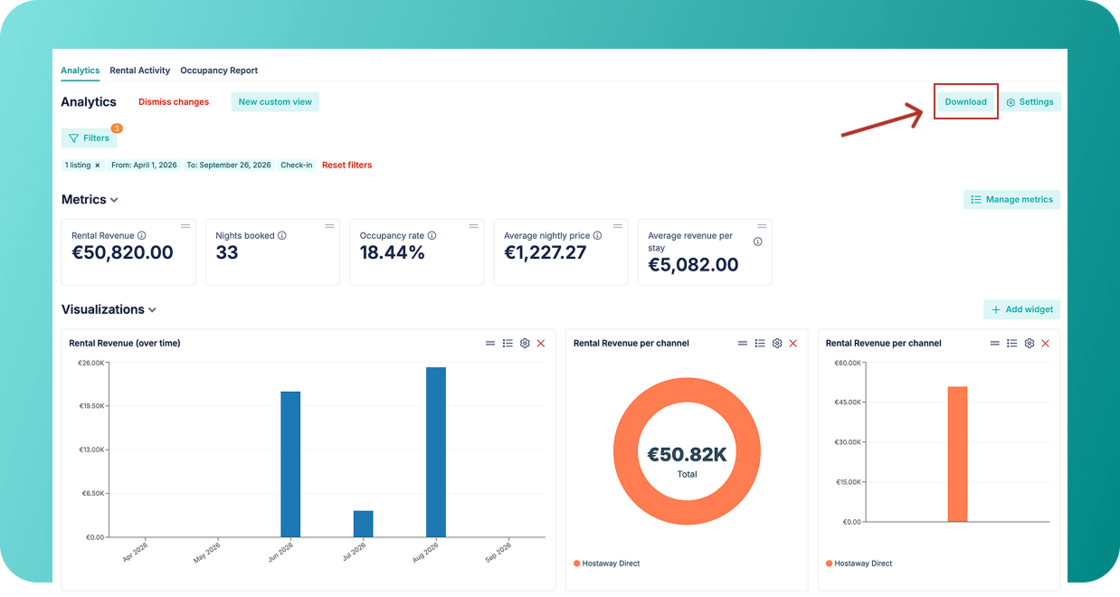
You can now download your analytics dashboard in a few clicks, making it easy to share visual insights and performance updates with owners, partners, or your team.
What's new:
-
PDF export with adaptive layout: Download your entire analytics dashboard as a nicely formatted PDF.
-
Visuals and data together: Your export includes both your charts and the underlying data tables so you have the full picture in one document.
How it works:
-
Go to your Analytics board
-
Click the new "Download" button at the top right of the dashboard
-
Check the instant PDF preview, switch between portrait or landscape layouts
-
Download it and share it with your partners or save it for your monthly reporting history
For an overview of the analytics page, check out our USER GUIDE.