Customize Financial Data Permissions
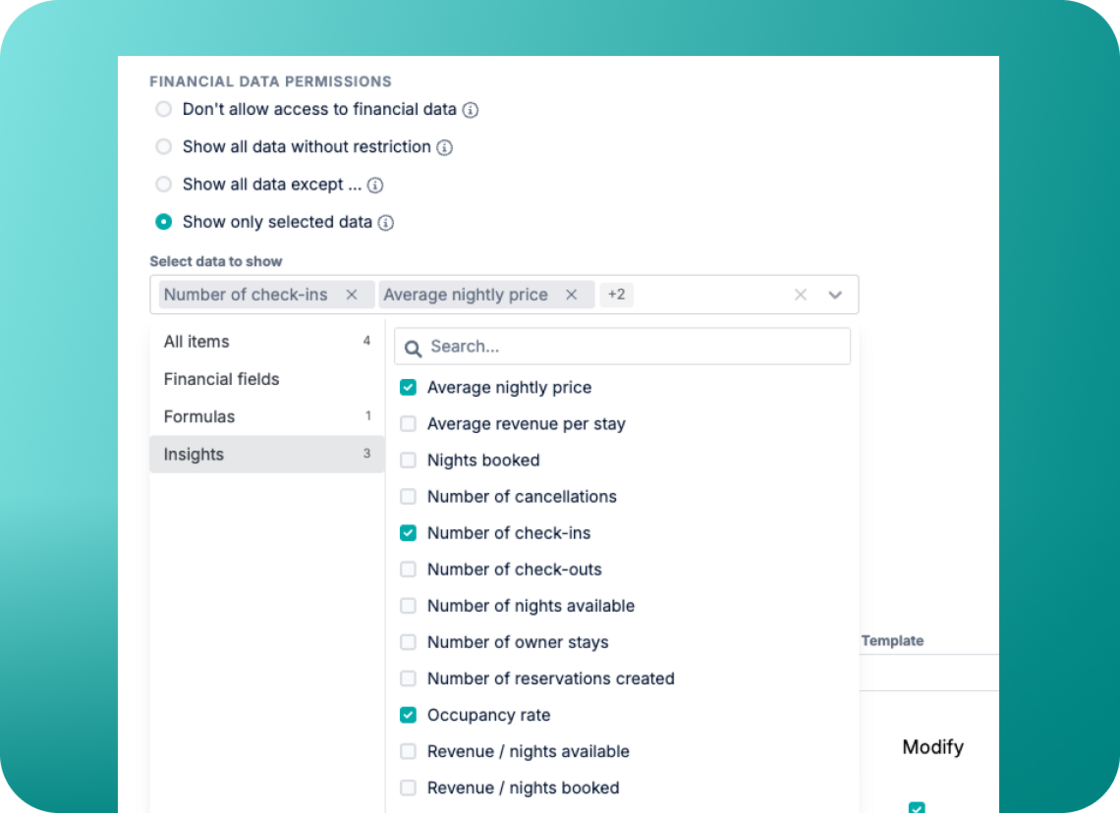
Managing financial and occupancy data access is now more flexible. Instead of having all-or-nothing data access, you can customize exactly what financial information each user can see in the dashboard.
This allows you to share necessary details with team members or property owners without revealing sensitive data or total values.
Choose from these flexible options:
-
Don't allow access to financial data: Financial and occupancy data won't be accessible.
-
Show all data without restriction: Gives access to all financial and occupancy data.
-
Show all data except: Hide specific financial fields, formulas, or occupancy-related insights.
-
Show only selected data: Only reveal the financial fields, formulas, or occupancy insights you explicitly choose.
How it works:
-
Go to User Management, edit or create a user and navigate to Financial data permissions.
-
Choose your restriction type under Financial data restrictions (e.g., Show all data except…).
-
Select which specific fields to show or hide.
You can securely share relevant financial details with property owners. Provide the transparency owners need to feel confident in your services, helping you retain clients and build trust. For more details, you can check out our user guide.