Convert Owner Statements into Auto-Statements in One Click
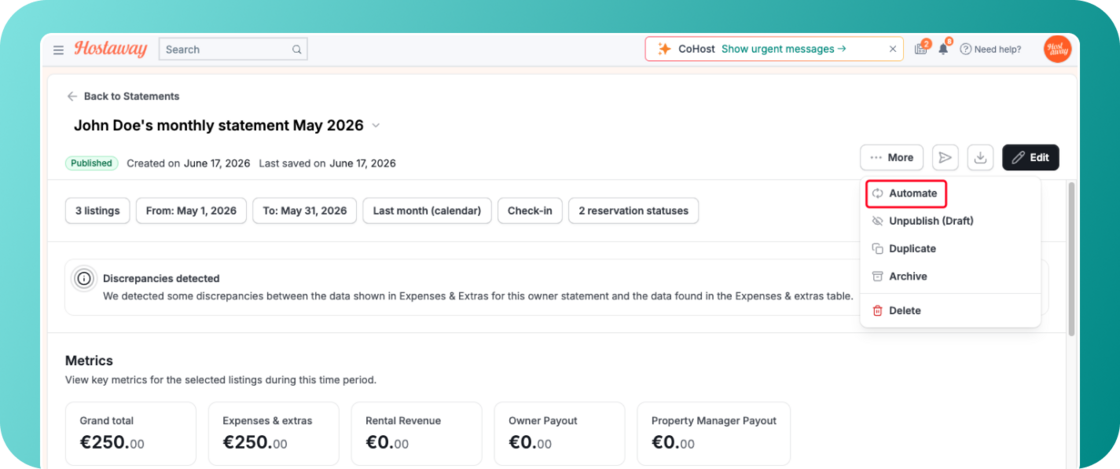
You can now convert any manual Owner Statement into an Auto-Statement with a single click. This new feature closes the gap on manual workflows, saving property managers valuable time.
What's New:
-
"Automate" Button: Users with create permissions will see a new automate option directly on individual manual statements and in statement view mode.
-
Pre-Populated Fields: Clicking "Automate" opens the new auto-statement creator with all details (owners, filters, metrics, columns, and layout) pre-filled from your manual statement.
-
Schedule (Smart defaults): ON by default. It generates as a draft on the 5th of each month for the previous month.
-
Emailing (Smart defaults): ON by default. This applies going forward when toggling auto-schedule ON for manual or existing auto-statement.
How It Works:
-
Open any individual manual owner statement
-
Select "More" and then click the new "Automate" button
-
Review the pre-populated settings, click "Next" to confirm your schedule, and click "Create"
-
A notification will confirm your new auto-statement is active
For more details about owner statements and auto-statements, check out our USER GUIDE.