Bulk Copy Financial Settings to Other Listings
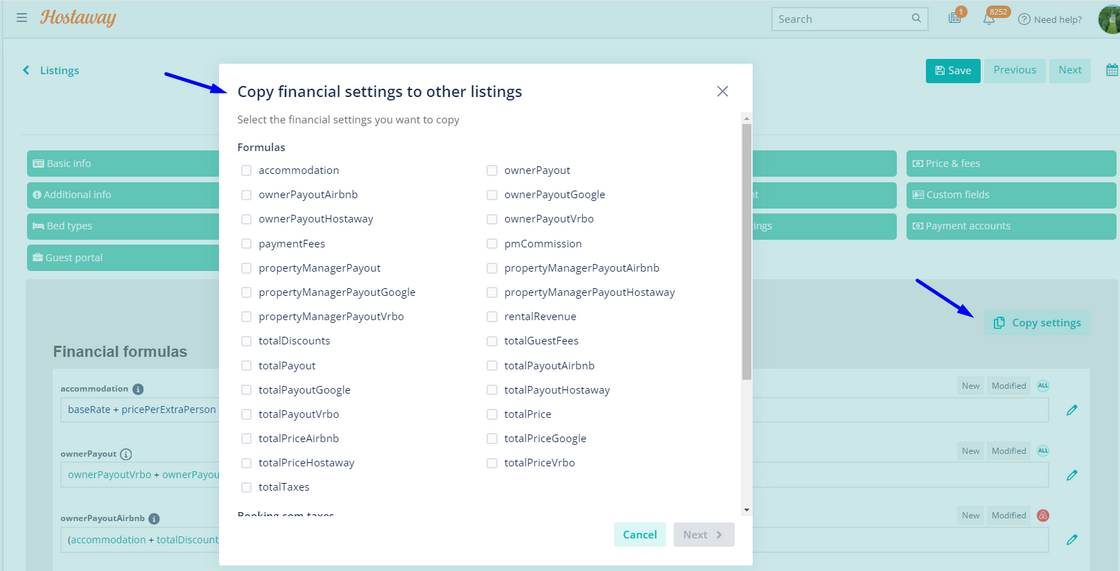
Previously, changes made to your listings’ financial settings had to be made individually, making the updating and onboarding process time-consuming. After initially applying formulas to all listings, adjustments are often necessary.
A common use case, for instance, involves adding and modifying financial settings for each listing. For channel-specific uses, such as Vrbo commission percentages, these settings must be entered for each listing.
Now, financial settings can be copied from one listing to others, streamlining the process significantly.
How It Works:
-
In Listings, click “Edit” on a Listing, then “Financial Settings”
-
After making your updates, select “Copy Settings”
-
Select the settings you want to copy, then the listings you want to copy them to, then hit “Save & Export”
For more information on Listing Settings, check out these SUPPORT ARTICLES.