Booking.com Listing License Requirements Now Visible in Dashboard
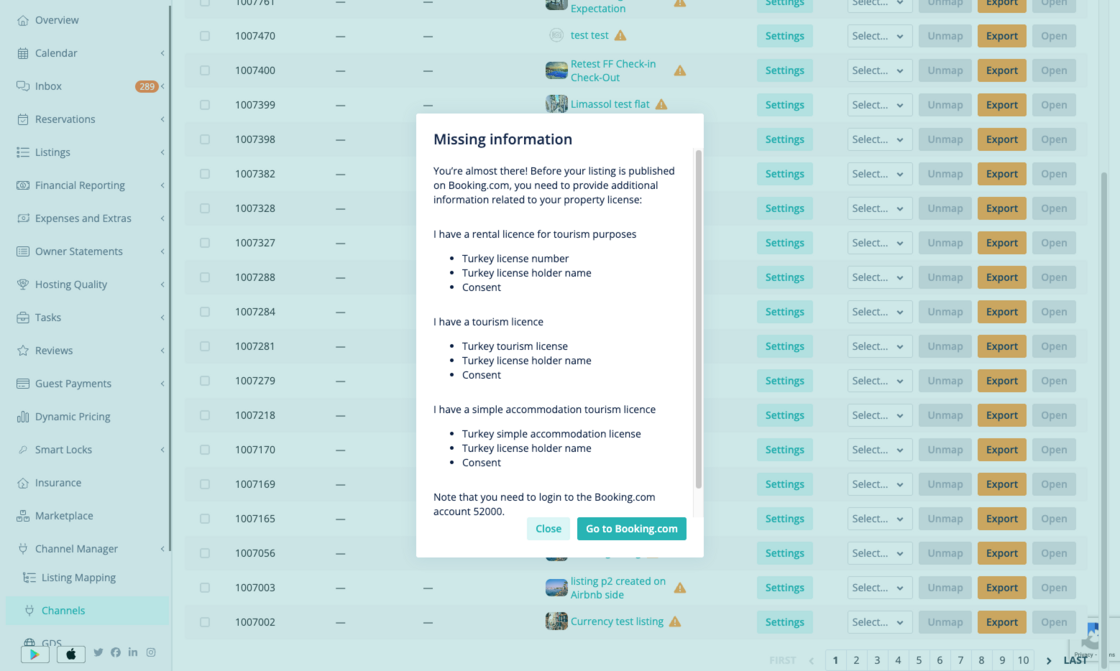
You can now see what license information is needed to get your Booking.com listings live, directly from your Hostaway dashboard.
How it works:
-
A warning icon appears in your channel list if any listings are unpublished on Booking.com due to missing license info.
-
Listings missing license details are flagged on the Booking.com channel configuration page.
-
Click the warning icon to view the required license information, as provided by Booking.com.
-
Follow the prompt to enter the required information in the Booking.com Extranet.
Property managers often miss out on bookings because they don’t know the license info is missing. This update makes it easy to spot and fix, so you can get your listings live and start receiving reservations faster.
For more details on publication status for Booking.com, you can check out our USER GUIDE.