Airbnb Co-Host Messaging in the Inbox
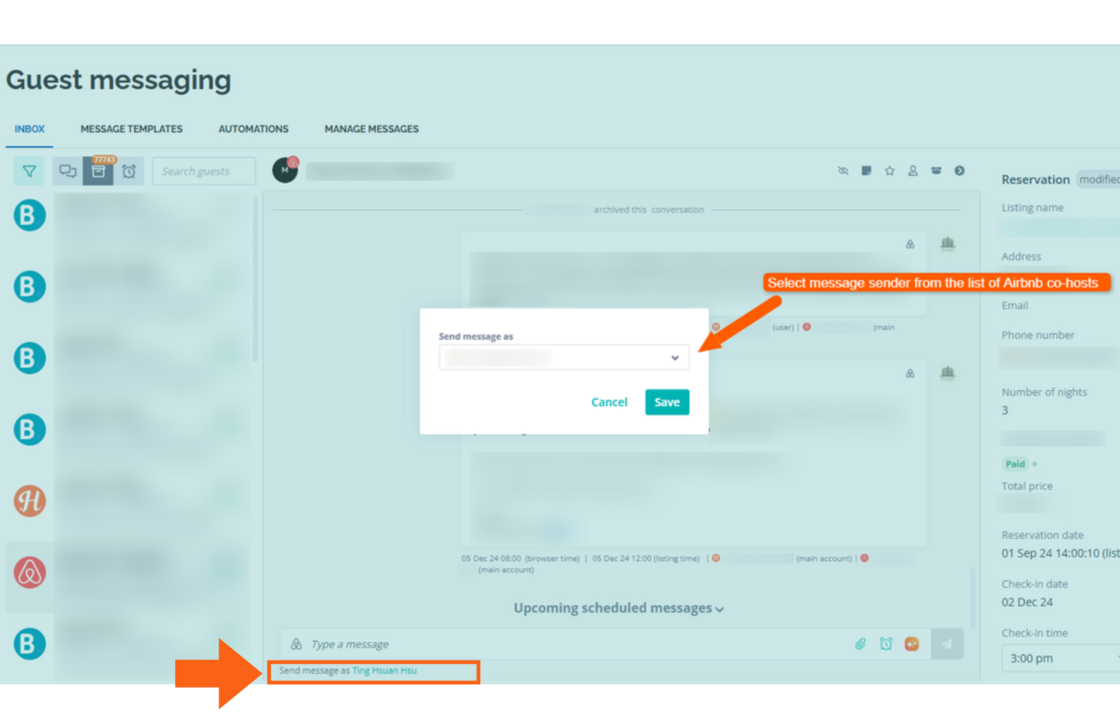
Before, users of the Hostaway Inbox could only send messages as the Airbnb listing owner.
This new feature allows accounts with Airbnb co-hosting permissions to be the sender for messages sent from the Inbox.
How it works:
-
From the Inbox, select a conversation with an Airbnb Guest
-
Below the text input field at the bottom of the message window, click on "Send message as [NAME]"
-
Select from the drop down who you want to send the message as
Notes:
-
The feature only covers manually sent messages (not auto-messages)
-
Only available on the Dashboard (not mobile)
-
The user must have co-host access to the listing on Airbnb
-
The co-host's Airbnb account must be connected to Hostaway from the Channel Manager
-
The listing should be re-imported to refresh our list of co-hosts assigned to the property on Airbnb
.
For more information on the Unified Inbox, check out our USER GUIDE