AI Suggestions and Translate in the Inbox Composer
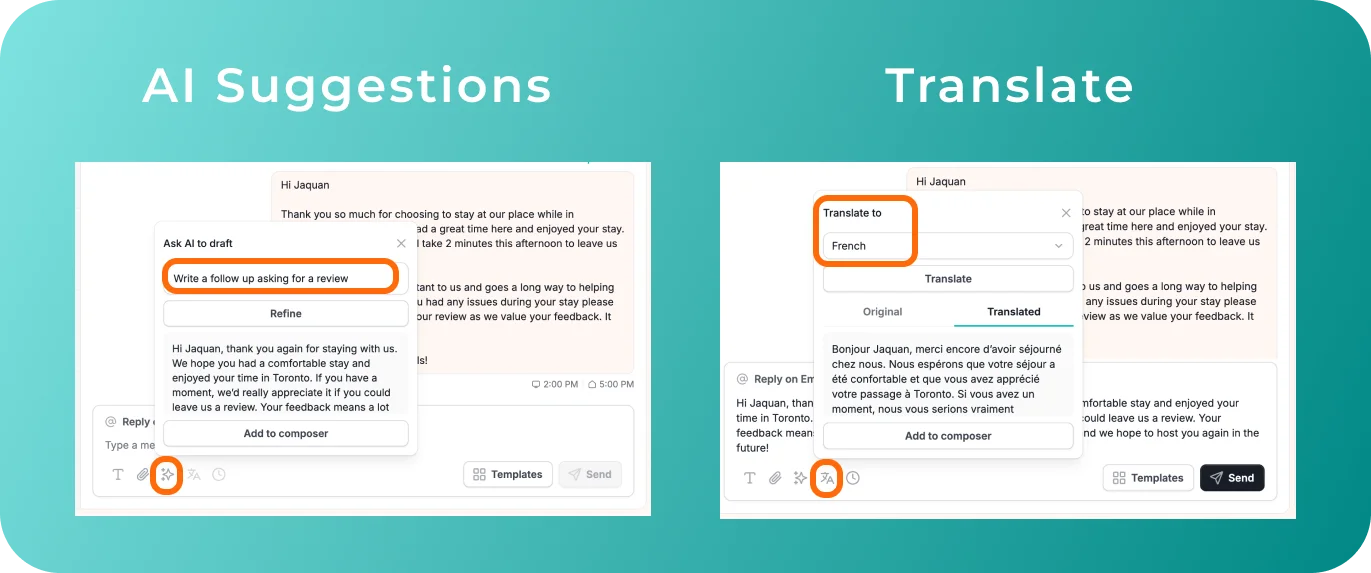
We've added new tools to make messaging guests more intuitive and self-contained. Previously, hosts had no quick way to polish a reply they'd already typed, and no easy way to translate an outgoing message. That meant copying text into a separate tool and pasting the result back. Now it all happens in the Inbox message composer.
What's New
Two new icons in the Inbox composer:
- AI Suggestions: Turn a rough line into a polished reply with one click. Or let AI draft a message from scratch when you know what you want to say, but not how to phrase it.
- Translate: Type your message in your own language and translate it with one click. After it's sent, you can still see it in both languages.
Why it Matters
- Faster replies: No rewriting from scratch, and no additional tool for translation.
- Guests answered in their own language: All from inside the Inbox message composer.
- More choice: Hosts can send messages in their preferred method, using AI suggestions, AI drafts, or Auto-reply.
For an overview of the Inbox, check out our USER GUIDE.